Google+ High Tech House Calls
Expert Computer Consulting for Homes and Small Businesses

Let there be hope...

Life has changed there is no doubt and we wanted to reach out to see how you are doing.

As we go through this interesting time, we are trying to look at this as an opportunity to focus on our family and on friends like you. Let us use this extra time to catch up and talk more. Let us cook food that is not fast, but interesting and satisfying. Let us learn to enjoy a time to try new things. Let us find ways to enjoy time at home!

Computer Security

If my client base is any experience, anyone can be a victim of a Ransomware, Malware or Virus attack.

What can you do about it?

I conduct audits of your entire computer infrastructure and apply best practice solutions to plug the security holes on your computers, Smartphones and networks.

Now offering consultations to give you the best protection possible:


404.229.0839
carlthorne@hthcatlanta.com

Jack of All Trades, Master of Many

Jack of All Trades, and Master of Many

We provide technical support for:


Homes and small businesses

Windows and the Mac OS platform

iPhones and Android Smartphones

Wireless and wired networks

New device setup

Old device upgrade or repair

One-on-one training

Remote assistance


How To Stop Malware

Tuesday, December 6, 2016

Refurbished vs. Used vs. Certified Pre-Owned: Which is Better? by James Frew

With yearly upgrade cycles, there are regular chances to snatch shiny new phones, laptops, TVs, and wearables. But what if you aren’t worried about being on the leading-edge of technology? Or what if you want to save some money on your purchases?  Just because you're being frugal doesn't mean you can't enjoy tech! Here are some tips on how to not break the bank with tech purchases. Read More
 
Well, you can always purchase non-new devices. A new device is one that is has not been used, purchased, or opened at all. It should still be in the original manufacturer’s packaging and with the full manufacturer’s warranty.

Any product that isn’t listed as new should be assumed to be pre-owned in some form. But there are a lot of terms thrown around in the second-hand market, from refurbished to used to pre-owned and even certified pre-owned. But what is the difference between them all?

Refurbished

A refurbished item is likely to have been used and either returned as used or returned as faulty. A product that is listed as refurbished will have undergone diagnostic testing, any faulty parts will have been replaced, everything will have received a thorough cleaning, and it will have been repackaged.
Guy Repairing and Tinkering With Smartphone
Image Credit: mickyso via Shutterstock
As an incentive to purchasing a refurbished item, the manufacturer or retailer will typically add an additional warranty. This is a huge benefit so you can have peace of mind should anything go wrong with the device. However, it is best to check the length and terms of the warranty as it will differ between retailers.

On eBay, there are two different categories of refurbished devices: manufacturer refurbished and seller refurbished. They even maintain an Item Condition Look-Up Table which allows you to view the item conditions for different categories of products. Both types of refurbishment should have restored the device as close to original specifications as possible, but the difference is that a seller refurbished device has not been approved by the manufacturer.

How to Shop Refurbished

eBay does let you contest a sale if the item is not as described. However, it’s probably still worthwhile to do some research on the seller before committing to a seller refurbished device. Make sure you check out their ratings, how many products they have, and try to get a sense of whether you can trust their refurbishment process. Welcome to Ebay Shopping 101. You are the select few, chosen to be trained as sharp-shooting Ebay bidders, capable of finding the best deals and winning every auction. Read More
Factory Refurbished Sign
Image Credit: prokhoridze via Shutterstock
Many manufacturers have their own certified or factory refurbished devices for sale, usually at a decent discount. Some of the most notable are Apple (who started selling refurbished iPhones), Dell, and GoPro. Amazon recently launched a Certified Refurbished store where you can browse all the certified refurbished items listed on the site.

While Amazon allows both manufacturer and seller refurbishment, the Certified Refurbished category is determined by Amazon and can be revoked from a seller if they are found to not have a robust refurbishment process. Amazon’s Certified Refurbished program also provides each item with a warranty: 90 days in the US and 12 months in the UK and EU.

There are places to buy refurbished items outside of major retailers or online stores. However, you are likely to be taking a bigger risk with your purchase as a smaller retailer or an unknown website claiming to sell refurbished items may not be as reputable. This could cause problems if you have any issues with your purchase.

If you choose to purchase a refurbished item outside of a major store, then make sure that the terms of sale are laid out in writing before you pay, and that there is a warranty or return process.

Used

Depending on where you purchase the item from, there will be different definitions of used. eBay defines it as “[an] item [which] may have some signs of cosmetic wear, but is fully operational and functions as intended.” By that definition, the item should work as expected but could be scratched or have a damaged screen.
Broken Used Smartphone
Outside of a regulated site like eBay or Amazon, the term “used” can take on any number of meanings. While a site like Craigslist can help you get a great deal, there is no regulation of how items are described and any sale is between you and the seller only, making complaints difficult to manage. The Ultimate Guide to Buying Used Devices I bought my current laptop, a 2011 Macbook Pro, on Craigslist almost four years ago. Here are some tips I picked up during my quest. Read More
 
Some people are happy to take the risk with buying a used device, especially since they offer far heavier discounts than pre-owned or refurbished devices. However, if you don’t want the hassle of attempting to fix a broken item, or being out of pocket, then you may want to pass over used items.

Pre-Owned

Pre-owned is generally a bit of a gray area. While it technically refers to any second-hand product, in most cases it usually refers to a well-taken-care-of item. This category of devices sits between Refurbished and Used, where it is in good, but not exactly new, condition.
Phone Cases Multicolor
Image Credit: RomanJuve via Shutterstock
In this sense it’s similar to “vintage” being applied to clothing. Another term you tend to see intermingled with pre-owned is pre-loved. The implication of those terms is that they are in generally good condition even though they’ve been used. There would be nothing explicitly wrong with them outside some minor cosmetic damage.

However, it’s always best to be skeptical of terms like pre-owned, pre-loved, and vintage. They are words designed to evoke a feeling in you that the items have been taken care of, but this isn’t guaranteed. As there is no agreed-upon definition, it varies across stores, sites, and sellers.

As with other second-hand items, understand the risks of purchasing a used item, especially when it comes to electronics or high-value purchases. Before committing, make sure you understand the seller’s return policy and any warranties offered.

Certified Pre-Owned

While pre-owned is essentially marketing speak for used, Certified Pre-Owned (CPO) actually has an entirely different meaning. CPO is a term in the used car industry that describes a vehicle that has been inspected by the automaker or dealer and returned to the original specifications. In this sense, it is very similar to a certified refurbished item.
Used Car Certified Pre-Owned
Image Credit: kurhan via Shutterstock
The used car is inspected and, if found, faults are repaired and parts are replaced. The warranty is typically extended either based on mileage, the months of the original warranty, or a parts warranty.
However, just as with Certified Refurbished, there is no hard-and-fast rule and the details will often vary between dealers and automakers.

Which Is Right for You?

For most people looking to invest in a second-hand piece of technology, refurbished is probably the way to go. You get the reassurance of a return to original condition as well as it being cheaper than a new model. This is especially true for certified refurbished products, which are typically refurbished by the manufacturer and offer a guarantee should anything go wrong with the device.

Note that depending on what you are trying to buy, whether its a smartphone, digital camera, or audio equipment, there are things to consider before you buy second-hand regardless. Should You Buy Second-Hand Tech? The Pros and the Cons Should You Buy Second-Hand Tech? The Pros and the Cons Tech is expensive, so buying second-hand is always an option. But is it a good idea? We take a look at the pros and cons of buying pre-owned gear. Read More
 
If you are looking for a project, or have something specific in mind, such as a heavily used iPhone, then you probably won’t mind losing out on the warranty — and the price of a used device is likely to be far lower than a refurbished device. However, if you are looking to save some money on an item for yourself or as a gift, then your mileage will vary with a used item, and should something go wrong, you aren’t guaranteed that you won’t be out of pocket.

Yikes! 99 percent of these Apple accessories are fire hazards By Mark Jones, Komando.com


Online shopping is one of the most convenient things to ever have come from the internet. Most every retail store has a website that you can order products from directly. Then you have sites like Amazon and eBay where you can find pretty much anything you could imagine to buy, and many times at a great price.

One thing that you do need to watch out for when shopping online is counterfeit products. A new report says that some of these fake items could endanger your life.
Safety checks were recently performed on fake Apple chargers and the results are shocking! There were 400 counterfeit chargers tested and only three of them passed. That means that 99 percent of the fake chargers failed a basic safety test.

What's the danger?

Safety specialists at UL performed the tests that were commissioned by the Trading Standards Institute (TSI), a consumer protection body in the U.K. What they found was 99 percent of the fake Apple chargers didn't have enough insulation to provide protection against electric shocks.

The fake chargers were purchased online from eight countries, including the U.S. They tested for sufficient insulation by applying high voltage to the chargers. The CEO of TSI said you might save a little money by purchasing from third-party vendors, but it could cost you your home or even your life.

Fake chargers and power adapters can be quite dangerous. They can be poorly made and haven't gone through industry-standard consumer safety testing. These counterfeit items are such a problem that Apple recently brought a lawsuit against a company for selling them on Amazon.

How to spot a counterfeit charger

The best way to know you're not buying a fake charger is to purchase it from a trusted supplier. When you order items from third-party vendors it's a risk. Here are some things TSI says to look for to spot a fake charger:
  • Markings - Check the brand name or logo on the product. Counterfeit items could have design mistakes or even be misspelled.
  • Plug-ins - Plug the charger into a socket before plugging it into your gadget. Make sure the pins are the correct size and fit into the socket properly. If it doesn't fit in easily, don't use it.
  • Warnings - Real chargers come with user warnings and instructions. Make sure your charger has a set of instructions on how to operate it safely.
  • Damage - You should never use a charger that has visible damage. If the cable is worn or torn, do not use it.
Another safety tip would be to never cover a gadget while it is charging. This could cause it to overheat.

3 reasons why you should upgrade your router By Komando Staff, Komando.com

In the past, most households could get by with a basic single-band router that kept a handful of devices connected to the home network. These days, however, it's tough to find a home that doesn't have multiple devices connected to it. Smartphones, gaming consoles, tablets and laptops now compete for your online access.

If you're constantly losing your wireless signal, experiencing slow streaming video with constant buffering, or have to wait longer than usual for web pages to load, there's a good chance your router is having trouble keeping up with your networking demands. If that's the case it's time for an upgrade.
Here are three reasons to consider upgrading that old, out-of-date wireless router and our recommended router to get back to smooth data sailing.

1. Outdated router compatibility means slower speeds

Most consumers probably haven’t considered that their Wi-Fi router has become horribly out of date. As they start streaming more video and connecting more “smart” devices, they’re going to start noticing slowdowns.

Most people are still using router gear based on a 2009 Wi-Fi standard known as 802.11n. But the new 802.11ac is three times faster and offers greater range and bandwidth. Still, routers using the slower standard outsold equipment with the newer technology last year.

2. Consumers need faster wireless for online video

Ready to dive into the newest Netflix binge-worthy show? Great! There's just one caveat. Viewers are now finding that their smart TV sets and connected boxes—like the Apple TV, Google Chromecast or Amazon Fire Stick—aren’t able to watch all the internet video they want without buffering, especially as more shows become available in high definition and ultra-high definition.

3. Growing sales of "smart" appliances put further strains on home networks

On average, 5.5 million smart devices a day are being connected in homes around the world, according to research firm Gartner. In addition, it estimates there will be 6.4 billion of these "Internet of Things" devices by year's end, and 20.8 billion IoT devices by 2020. This futuristic technology is certainly the next wave of technology but also means more data for your already over-worked router to process.

Other than reverting back to the Stone Age, the solution is to upgrade your home router to at least 802.11ac capacity. Netgear’s Nighthawk line is the best-selling consumer router with 802.11ac and its performance reviews have been very solid.

Which smartphone has the best camera? By Mark Jones, Komando.com


Smartphone technology keeps getting better and better. They aren't just for talking anymore. It's just amazing the number of things we can do with a gadget that fits in the palm of our hand.

You can surf the internet, turn the smartphone into a remote to control other devices, play high graphic video games and so much more.
One piece of technology that has made serious strides lately is the smartphone camera. It can be the deciding factor when selecting which smartphone is best for you.

With that in mind, we'll take a look at some of the best smartphone cameras available today, and which one we feel is the best.

Moto Z

moto-z
The Moto Z by Motorola was released in the summer of 2016. It has a sleek, ultra-thin design and comes with an advanced, low light camera. You are able to capture clear pics with laser autofocus and optical image stabilization.

What makes this smartphone's picture-taking ability exceptional is its compatibility with Moto Mods. These are accessories that snap onto the Moto Z using integrated magnets.

A great Moto Mod for photography is the Hasselblad True Zoom. It provides a 10x optical zoom, Xenon flash, and RAW format shots. The downside is the extra cost. The Hasselblad True Zoom costs around $300.
moto-pod

iPhone 7 Plus

7-plus
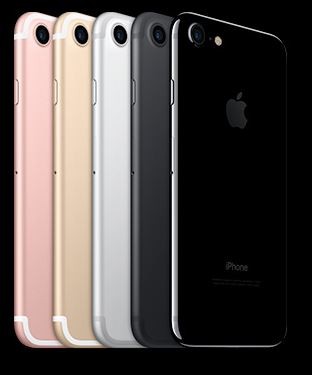
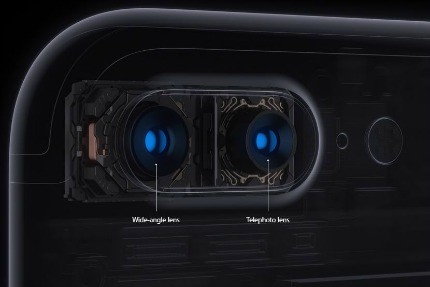
Apple released the iPhone 7 Plus in September. One compelling new feature of the iPhone 7 Plus is the dual-lens camera.

The telephoto and wide-angle lens on the 7 Plus work together to allow depth-of-field or bokeh (background blurring) effects on photos similar to what digital single-lens reflex (DLSR) can do. The improvement of the camera's zoom due to the addition of a telephoto lens is another new feature great for photography fans.

That means you can get higher-quality zoom from farther away. And with an all-new Portrait mode, portrait shots will look better than ever.
dual-lens-sized

Google Pixel

pixel-sized
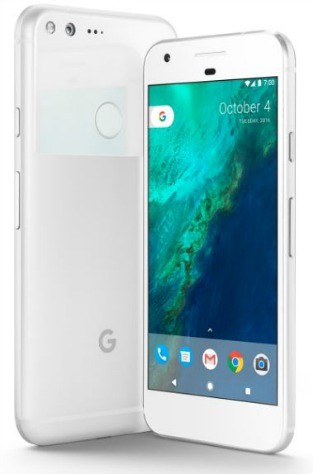
Pixel by Google lets you take brilliant photos in low light, bright light or any light.

It has a 12.3 MP camera for sharp, crisp images. With f/2.0 aperture, for bright, even photos.

With Google Pixel, it's easier than ever to take the perfect photo. You can catch action shots as they happen with Smartburts. And, Google Photos keeps all your photos backed up and organized, so you can find and share them faster than ever.

Best smartphone camera: Samsung Galaxy S7

galaxy-s7-sized
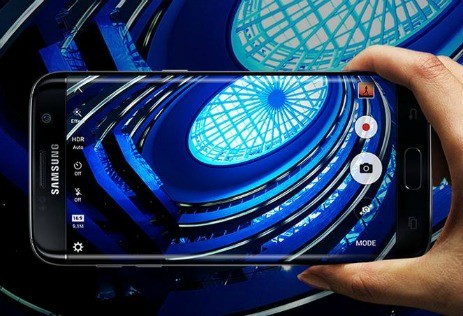
Another smartphone that came out in 2016 with a great camera is the Samsung Galaxy S7.

With an F1.7 lens, the Galaxy S7 has the widest aperture available in a smartphone, letting the most light into the camera. And with Dual Pixel technology, it captures so much light that your photos come out sharp and detailed, even in the dimmest situations.

It also has a Dual Pixel camera. The autofocus focuses as fast as you can blink, so you can capture the most sudden of movements. This means less blur, even if you are taking pictures on the go.
These features, along with a 12MP camera on the back and 5MP on the front, make this smartphone great for taking photos. It's my choice as the best smartphone camera available.

You really can't go wrong with any of the phones we looked at in this article. You can compare each of their specs on the chart below and decide which one is best for you.

OSStorageCamera(Front/Rear)Display
Moto ZAndroid 6.0.132GB5MP/13MP5.5 inches2560x1440
(535 ppi)
iPhone 7 PlusiOS 1032GB,128GB,
256GB
7MP/12MP5.5 inches1920x1080
(401 ppi)
Samsung Galaxy S7Android 6.0.132GB5MP/12MP5.1 inches2560x1440
(577 ppi)
Google PixelAndroid 7.132GB,128GB8MP/12.3MP5 inches2560x1440
(441 ppi)

How to Set Your FaceTime Caller ID by iPhoneLife Magazine


If you have multiple numbers and email addresses associated with FaceTime, you can set which one will appear as your caller ID. Setting your caller ID will allow the person receiving your call to always see the same contact and know it’s you. Your caller ID can be your phone number or linked email account, depending on your preference. We'll cover how to change your Facetime caller ID in a just a few easy steps. 
  • To do this, open Settings.
  • Tap FaceTime.


Share this tip with a friend:

Share on Facebook


Tweet


Mail


  • Scroll down to the section titled Caller ID and choose the one you’d like to use.

That's all there is to it! If you're concerned friends won't recognize your number, using an email that has your name in it is your best option. Your Facetime caller ID choices will likely be your Apple ID email, your iPhone number, and your iCloud email. 
Top Image Credit: Kudla / Shutterstock.com
Did you enjoy this tip? Sign up here to get the tip of the day delivered right to your inbox.

Saturday, September 3, 2016

Extend the Life of Your Old iPhone and iPad by Geoffrey Fowler

Hackers Hold Computers for Ransom by Robert McMillan

Saturday, August 6, 2016

Text Nexk Troubles

Lots of chouces for back to school by Marc Saltman