Google+ High Tech House Calls
Expert Computer Consulting for Homes and Small Businesses

Let there be hope...

Life has changed there is no doubt and we wanted to reach out to see how you are doing.

As we go through this interesting time, we are trying to look at this as an opportunity to focus on our family and on friends like you. Let us use this extra time to catch up and talk more. Let us cook food that is not fast, but interesting and satisfying. Let us learn to enjoy a time to try new things. Let us find ways to enjoy time at home!

Computer Security

If my client base is any experience, anyone can be a victim of a Ransomware, Malware or Virus attack.

What can you do about it?

I conduct audits of your entire computer infrastructure and apply best practice solutions to plug the security holes on your computers, Smartphones and networks.

Now offering consultations to give you the best protection possible:


404.229.0839
carlthorne@hthcatlanta.com

Jack of All Trades, Master of Many

Jack of All Trades, and Master of Many

We provide technical support for:


Homes and small businesses

Windows and the Mac OS platform

iPhones and Android Smartphones

Wireless and wired networks

New device setup

Old device upgrade or repair

One-on-one training

Remote assistance


How To Stop Malware

Saturday, May 28, 2016

Roku Streaming Stick review: The only streaming device you need Daniel Howley

Roku’s first Streaming Stick has been the best streaming device around for some time. It’s inexpensive, unobtrusive, and packs Roku’s ginormous collection of streaming channels.

But it’s not perfect. Compared to rivals like Amazon’s Fire TV Stick and the Apple TV, the Roku Stick is preposterously slow.

But Roku has introduced a new Streaming Stick for all of your Netflix and chilling needs. And it’s not only light years faster than its predecessor thanks to a quad-core processor, it’s also slimmer and features an updated smartphone app, too. Oh, and it’s still just $50.

In other words, the best streaming device just got better.

The stick

The new Roku Streaming Stick isn’t much to look at, because, well, there just isn’t much to it. The Stick is so small and slim it could easily pass as an abnormally large USB stick.

That’s all the more impressive when you consider that the original Roku Stick wasn’t very large to begin with. More than anything, the new Stick is far more streamlined. It measures just 3.3 x 0.8 x 0.5 inches. There are lipstick cases bigger than this thing. It’s actually kind of mind blowing that so much technology is packed into such a tiny gadget.
The old Stick’s cartoonish, bubbly purple design has been replaced with a more aggressive jet-black body that says, “I came here to kick ass and stream ‘Dora the Explorer’ for your two year old. And I’m almost out of episodes.”

There’s still a secondary USB cable you need to plug into the back of the Roku Stick to give it the power it needs to work. Depending on the kind of TV you have, you can plug the line into your TV’s available USB slot or just plug it into a wall outlet using the included power adapter.

The remote

The original Roku Stick’s remote was … well, chunky. But like the Stick itself, the remote’s size wasn’t much of an issue. It’s not as if you carried the remote around with you all day like your smartphone. At least I hope you didn’t.

This time around Roku has sliced off a good amount of the remote’s bulk, making the new one more comfortable to hold. It’s also lighter, which is important when you lose it in your bed and inevitably send it sailing across the room as you frantically flip the blankets over while trying to find it.
It’s also good to see that Roku has done away with the sad Blockbuster button on the remote and replaced it with a Google Play button. God knows the only people that ever pressed that button only did so by accident while trying to reach for the remote in the middle of the night.

The setup

Setting up the new Roku Stick is far faster than setting up the original Stick. After plugging the Stick into my TV and wall outlet, I connected to my Wi-Fi network, registered my Roku account and downloaded streaming channels in about 10 minutes.

After you’ve downloaded the channels you want to watch, you have to log in to each service. But with the new Stick’s faster quad-core processor, hunting and pecking for letters via Roku’s on-screen keyboard is easier since there’s no longer and lag when moving the cursor between letters.

Using the Roku Stick

Not much has changed in terms of Roku’s interface. You’ll still navigate the same menus and follow the same on-screen prompts, but there are two new features to look for.

My Feed TV Shows and My Feed Movies let you follow shows and movies that you like. When the shows are available via a certain streaming service or become available for free, you’ll receive an update from My Feed.

Beyond that, the biggest difference you’ll notice when using the new Roku Stick is how much faster it is. I’ve been using the original Stick for about a year and a half now, and every once in awhile it likes to play this little game where it decides to take forever to load Netflix or Hulu.
The new Stick, on the other hand, flies. Movies and shows load as soon as you select. Heck, even thumbnails pop up quickly, which means you no longer have to wait for pictures of your favorite movie and TV show logos to load so you know which episode of “RuPaul’s Drag Race” you’re up to.

The Stick does force some tradeoffs, though. Namely, it doesn’t support 4K video and doesn’t have any ports for optical audio or Ethernet connectivity.

But let’s face it, there isn’t enough 4K content out there to stream yet anyway. And chances are, if you’ve got an Ethernet connection in your home, you’ve also got Wi-Fi. As for folks interested in optical audio, well, I’ve got nothing for you.

The app

Roku’s updated app for iOS and Android brings along one major change that will make a lot of people happy: private listening mode. With more premium Roku devices like the Roku 3 and Roku 4, private listening is available by plugging your headphones into the included remote.

The Roku Stick’s remote doesn’t come with a headphone jack, but thanks to the updated Roku app you can get the same benefit using your smartphone. That said, listening mode only works with the new Stick for now.
I used the app to listen to “Bob’s Burgers” while in bed, and the show and what I heard synced up perfectly.

I bought my parents a Roku 4 for Christmas last year specifically for the private listening remote, because I didn’t want my dad to wake up my mom when he turns on the TV at night.

The bottom line

So to recap: The Roku Stick was already the best deal in streaming devices thanks to its enormous number of available streaming services ranging from Netflix and Hulu to Amazon Prime Video and Google Play Movies. And now it’s faster, has private listening mode via the free Roku app, and costs just $50.

Sure, the Amazon Fire Stick is $40, the Apple TV has a beautiful interface and slick remote, and Google’s Chromecast is just $35 and lets you cast shows from your smartphone to your TV, but the value proposition behind the Roku Stick is just too much to ignore.

In other words: The king is dead, long live the king!

Netflix movies and TV shows coming and going in June By Meredith Cunningham


Since the mega-popular hit show "House of Cards" debuted on Netflix in February 2013, it's managed to capture several different awards spanning from Emmys to Golden Globes. Netflix's next original series, "Orange is the New Black," was released a few months later and followed suit.

This month, Netflix favorite "Orange is the New Black" is back with its fourth season on June 17 along with a brand new Netflix original, "A Very Secret Service" and a new comedy special from Bo Burnham.
On top of the great original content, Netflix is getting some other great stuff to watch too, such as the original Jurassic Park trilogy, "Spotlight," "J. Edgar" and "Bob Ross: Beauty is Everywhere."
But just as new titles appear, that means some have to disappear. Be sure to catch "Groundhog Day," "Who Framed Roger Rabbit," "Wayne's World" and others before they are removed.

WHAT'S COMING

* - Netflix Original
June 17
Chinese Brothers (2015)
72 Cutest Animals: Season 1
72 Dangerous Places: Season 1
A Walk to Remember (2002)
Big Stone Gap (2014)
Bob Ross: Beauty is Everywhere (1990)
Breaking the Magician's Code: Magic's Biggest Secrets Finally Revealed: Season 1-2
Cold in July (2014)
Conspiracy Theory: Did We Land On The Moon? (2001)
Cuba: The Forgotten Revolution (2015)
(Dis)Honesty: The Truth About Lies (2015)
El Libro de Piedra (1969)
Elizabeth: The Golden Age (2007)
Extraordinary Tales (2015)
The Fear of 13 (2015)
Gabo: The Creation of Gabriel García Márquez (2015)
Gentlemen and Gangsters: Season 1
The Good Witch: Season 1
The Great Alone (2015)
Hadwin's Judgement (2015)
J. Edgar (2011)
Jaco (2015)
Janis: Little Girl Blue (2015)
Jurassic Park (1993)
Jurassic Park III (2001)
Lion Heart (2013)
The Lost World: Jurassic Park (1997)
Meadowland (2015)
The Odd Couple II (1998)
Off Camera: Series 1
Pokémon the Movie: Hoopa and the Clash of Ages (2015)
Pokémon: XY: Kalos Quest: Season 2
Portrait of a Serial Monogamist (2015)
The Resurrection of Jake the Snake (2015)
Rock the Kasbah (2015)
Sam Klemke's Time Machine (2015)
Second Coming (2014)
Tab Hunter Confidential (2015)
UFOs: The Best Evidence Ever (Caught on Tape) (1997)
Underdogs (2013)
What Our Fathers Did: A Nazi Legacy (2015)
Wildlike (2014)

June 2
 Beauty & the Beast: Season 3
* - Hibana: Spark
Pretty Little Liars: Season 6

June 3
 * - Bo Burnham: Make Happy

June 6
Darkweb (2015)

June 7
Every Thing Will Be Fine (2015)
Jarhead 3: The Seige (2016)

June 10
* - LEGO Friends: The Power of Friendship: Season 2
* - Voltron: Legendary Defender: Season 1

June 11
Me Him Her (2016)
Scandal: Season 5

June 12
Already Tomorrow in Hong Kong (2015)

June 4
The League: Season 7

June 15
After The Spill (2015)
Boom Bust Boom (2016)
The Giver (2014)
In the Shadow of the Moon (2007)
Naz & Maalik (2015)
Night Owls (2015)
Poverty, Inc. (2014)
Top Spin (2015)
TransFatty Lives (2015)

June 16
Being Mary Jane: Season 3
Marvel's Agents of S.H.I.E.L.D.: Season 3
The Unborn (2009)

June 17
* - All Hail King Julien: Season 3
* - Orange is the New Black: Season 4

June 18
Cedar Cove: Season 3
Grey's Anatomy: Season 12

June 19
Bunk'd: Season 1
I Am Thor (2015)

June 20
Life Story: Series 1
The Making of Life Story

June 21
Best Friends Whenever: Season 1

June 22
Sin City: A Dame to Kill For (2014)
Spotlight (2015)

June 24
* - Dragons: Race to the Edge: Season 3
* - The Fundamentals of Caring (2016)
* - Justin Time GO!

June 27
Cronies (2015)

June 29
Life (2015)

June 30
* - A Very Secret Service: Season 1
Palio (2015)
(T)ERROR (2015)


Movies Going Away...
June 1
A Wrinkle in Time (2003)
About a Boy (2002)
Bounce (2000)
Bridget Jones's Diary (2001)
The Chronicles of Riddick: Dark Fury (2004)
Clear and Present Danger (1994)
Click (2006)
Darkman (1990)
Disney Animation Collection: Vol. 5: Wind in the Willows
Dude, Where's My Car? (2000)
Duplex (2003)
Elias: Rescue Team Adventures: Season 1
The Faculty (1998)
Far from Home: The Adventures of Yellow Dog (1995)
Ghost (1990)
Groundhog Day (1993)
Hamlet (2000)
Hercules (1997)
In the Bedroom (2001)
Jersey Girl (2004)
Kinky Boots (2005)
Lassie (2005)
Losing Isaiah (1995)
Madonna: Truth or Dare (1991)
Marvin's Room (1996)
Music of the Heart (1999)
My Boss's Daughter (2003)
Nine Months (1995)
The Others (2001)
Paris Is Burning (1990)
Private Parts (1997)
Proof (2005)
Schoolhouse Rock!: Earth (2009)
The Sisterhood of the Traveling Pants (2005)
The Station Agent (2003)
The Stepford Wives (2004)
Stir of Echoes (1999)
Stir of Echoes 2: The Homecoming (2007)
The Super Hero Squad Show: Seasons 1-2
Velvet Goldmine (1998)
View from the Top (2003)
Wayne's World (1992)
The Yards (2000)

June 2
Eureka Seven: Seasons 1-2

June 14
HawthoRNe: Seasons 1-3

June 15
The Bank Job (2008)

June 21
Mixology: Season 1

June 24
Elaine Stritch: Shoot Me (2013)
The Hunchback of Notre Dame (1996)
The Hunchback of Notre Dame II (2002)
Marvel's Avengers Assemble: Season 1
Mulan (1998)
Who Framed Roger Rabbit (1988)

June 30
Sophie's Choice (1982)

The 7 Worst Places for Downloading Windows Software by Joel Lee


Malware is the bane of the Internet. Seriously, few things on the web are as dangerous as contracting malware, and few things are as time-consuming as the process of malware removal. Avoid at all cost.

But here’s the thing about malware: It’s not enough to install a top-notch security suite. You’ll have to change your bad security habits and start doing what the experts do.

And if there’s one habit that you must kill as soon as possible, it’s the carefree downloading of software from any and all sites. Today, free software download sites are one of the most common sources of bloatware and even malware.

1. CNET Download

Go around and ask people what they think of CNET Download — the site formerly known as Download.com — and most of them will probably tell you to stay away. You should heed that advice if you know what’s good for you.

CNET Download has been around since 1996, making it 20 years old at the time of this writing. It used to be the most popular download destination on the web, but in those two decades, the site has really gone downhill.
bad-download-cnet-download
In 2011, the site introduced a download manager program called CNET TechTracker that was allegedly full of toolbars and bloatware, which was so bad that it was eventually flagged by security suites. Then in 2015, malware was found to be bundled with their installer files.

Can you download files safely from CNET Download? Yes, you can, but it’s risky. Few people trust CNET Download anymore and using the site is akin to crossing a minefield. Your next step could be your last.

2. Tucows

Tucows is another free download site in the vein of CNET Download. What’s funny is that Tucows is actually older than CNET Download — by about three years. Started in 1993, Tucows is one of the oldest download sites in the world.

In 2008, Tucows announced that they would be shifting focus away from software downloads to diversify their business. It would go on to launch the Ting mobile service network, among other business ventures.
bad-download-tucows
Since shifting focus, Tucows has been involved in a few malware-related incidents. For example, in 2010, it served malvertisements to visitors. And in 2015, Emsisoft found that Tucows served the most potentially unwanted programs with its downloads.

We recommend staying away. There are better sites out there with more up-to-date repositories and less malware to worry about.

3. Softonic

Not to be confused with Softpedia, which is mostly reputable for what it is, Softonic is another ancient download site that has been around for a long time — since 1997 — and it’s actually foreign, based in Spain.

Starting in 2009, Softonic spearheaded several different distribution models, including the Softonic Toolbar and the Softonic Downloader. Even when users opted out, they were blasted with these kinds of unwanted programs, which is why Softonic has such a poor reputation now.
bad-download-softonic
In 2015, the co-founder of CNET Download became the new CEO of Softonic. The Toolbar and Downloader were immediately dismantled and the site promised to dedicate itself to clean and safe software, but it’s still too early to tell.

Considering how poorly CNET Download has performed in terms of delivering clean and safe software, we recommend treating Softonic with similar caution and avoiding it until the site proves itself and walks the talk.

5. Public Torrent Trackers

Despite what a lot of people think, torrenting itself isn’t actually illegal. Indeed, there are plenty of legal torrents out there and they’re all valid and legitimate. But let’s be real: if you torrent, you’re probably doing it illegally.

We don’t condone the practice, but if you are going to download torrents, heed this warning. Public torrent tracker sites like ThePirateBay may contain malware.
bad-download-torrent-sites
For example, malvertising is a big concern where advertisements are used to distribute malware. Malware can also exist inside fake torrent downloads. If you download a movie and it says you need to install a special video codec, that “codec” is probably malware.

According to a 2015 study, users are 28 times more likely to contract malware from torrent sites than mainstream websites.

Long story short, torrents are risky. The risk goes down if you switch to using private torrent trackers but even those can be dangerous, if you aren’t careful.

5. File Hosting Services

Piracy exists in many forms. Torrenting is the most controversial and public form, of course, but file hosting sites make up a huge chunk of the piracy realm. Remember the now-defunct MegaUpload? Yeah, those sites.

Like torrent sites, file hosting sites are prone to malvertising attacks and downloads that contain malware, but they also have a third form of malware distribution: the fake download button.
bad-download-file-hosting-sites
We’ve all seen it before. You search for a pirated copy of a book or music album, for example, and arrive at a site like Turbobit or HugeFiles — only to see DOWNLOAD HERE all over the place. Here’s a good rule of thumb:
The bigger the download button, the faker it is.
We’ve written before on how to spot and avoid fake download buttons but these tricksters are constantly evolving and getting more deceptive. The only foolproof way to protect yourself is to avoid file hosting sites altogether.

6. Warez Exchange Forums

This one is sort of a corollary to the point directly above, but you should avoid warez sites as much as you can. For those who don’t know, warez are a form of piracy that mainly involves cracked software.
bad-download-warez-forums
Warez are usually exchanged within a community, though these communities can be publicly accessible through search engines. Most often, warez exchanges exist as forums but use various file hosting services for the actual sharing.

The threats are the same here: malvertising, fake warez, and infected warez downloads.

7. The Windows Store

There are so many reasons not to use the Windows Store. The lack of many important and popular apps is a huge downside, but there’s also a plethora of dead and abandoned apps that simply don’t work anymore.

But most of all, it seems as if the Windows Store isn’t as impervious to malware as once hoped.
bad-download-windows-store
The two biggest selling points of the Windows Store are: one, it’s highly regulated to filter out scamware and malware, and two, apps run in a sandbox to prevent them from gaining access to system files and processes.

Well, we’ve known for a while that the Windows Store is full of scamware and deceptive apps, but the sandbox aspect has been pretty good… up until now, at least.

Not long ago, ZDNet discovered a Windows Store app that used an in-app advertisement to download unwanted software. Microsoft is doing its best to solve this security hole, but for now, you may want to avoid downloading anything from the Windows Store.

Which Download Sites Do You Avoid?

This isn’t a comprehensive list, but it’s an important starting point. Too many sites out there can deliver malicious trojans and worms to your computer and it’s your duty to be wary and vigilant. You can turn to the safest software download sites, but they’re not perfect, either. Do remain cautious!

What should you do when you discover malware on your system? Follow our step-by-step guide to fighting a malware infection.

Did Google Make the Best iPhone Keyboard Yet? Meet Gboard by Mihir Patkar


Android users often get some features that iOS users don’t have. For the longest time, this included keyboards not made by Apple, which meant constant jibes from Android fanboys about Apple’s restricted system.
But with iOS 8, Apple opened the flood-gates, which allowed users to install third-party keyboards on iPhones, like SwiftKey, Swype, and many others. Who would have thought this would one day let Apple turn the tables on their Android counterparts?

Google recently launched a new keyboard for iPhones called Gboard, and it’s exclusively available on iOS right now. That’s right, even Google’s own operating system doesn’t have it. The kicker? It’s probably the best mobile keyboard you have ever used.

What’s Gboard All About?

Gboard looks just like the default iPhone keyboard, and you might not even notice the difference except for that Google ‘G’ logo in the top-left corner. But that’s what makes this app so special.
Gboard-simple-search
Tap that G and it opens Google search in the keyboard itself. Type what you want to search for, get suggestions, and browse the results — all without ever leaving the keyboard space or changing the app to go to your browser. To put it another way, Gboard is a Google Search browser baked into your keyboard.

But you can’t actually browse the links. Instead, the link acts as something you can see or share. For example, let’s say you’re talking with a friend in Messages and want to share the address of a restaurant to meet up at. Tap the ‘G’ button, search for the restaurant, and tap its location from the results. Google will automatically insert a Google Maps Card or the text address of the place, depending on where you tap.

Gboard Solves Multi-Tasking on Phones

In many ways, Gboard is the answer to the restrictions of a small screen and a virtual keyboard. That combination forces you to multi-task and switch between apps more than you’d like, which is what Gboard is trying to remedy.
Think about it: When you’re using a computer, switching between different tabs or apps isn’t a big deal. A quick Alt+Tab or Cmd+Tab will put you in Chrome, where you can search for what you want, copy the link, and go back. It happens in a matter of seconds.
gboard_gif_regularSearch-640
On a mobile screen, things are different. You are switching from full-screen app to full-screen app through multiple taps or gestures. Then you start typing. Then you get results, but you can’t really right click and copy the link location. So you open the link, and then you copy the address. And if you need to copy text, it’s even worse, with that long press followed by adjusting the two tiny cursors till you get the selection of text just right. Ugh.

Multitasking is getting better, but it’s still a long way away from perfection. Till then, Gboard eliminates all those steps. It is reducing how much you multi-task on an iPhone, and this makes your life easier.

How Is Gboard As a Standalone Keyboard?

Searching links and auto-pasting text is awesome, but that isn’t the only thing that makes a keyboard great. You’re going to use the Google search feature, but you’ll be using it as a regular keyboard more often. So how does Gboard perform as a keyboard?
Gboard-emoji-gif-search
  • Performance: I had no complaints with Gboard. The autocorrect is as good as the default iPhone keyboard, the long-press shortcuts for the special characters are in the same place or intuitive enough, and it doesn’t slow down.
  • Swipe: Gboard, much like Swiftkey and Swype, lets you swipe-to-type. What this means is that you can trace a word without lifting your finger, and Gboard will predict it correctly.
  • GIFs and Emojis: A brilliant feature of Gboard is the built-in search for GIFs and Emojis. When you type a word like “happy”, Gboard will automatically suggest the emoji for it. Search for “happy” in the Google search and choose “GIF” in the tabs below to insert an image from the language of the Internet.
Gboard-settings
In Gboard’s settings, you can choose to enable or disable any of these features, or others too. For example, if you use profanity while typing, you’ll probably want to disable Block Offensive Words.

GBoard and Privacy

Understandably, the biggest concern with Gboard is privacy. Google already knows a lot about you, and with this keyboard app, it can log everything you type! That can be pretty scary.

Thankfully, as it stands right now, Gboard doesn’t seem too scary. The privacy implications, laid out clearly in the App Store, indicate it doesn’t read what you type in other apps, apart from remembering things for spellings.
Gboard-search-contacts
“Gboard will remember words you type to help you with spelling or to predict searches you might be interested in, but this data is stored only on your device. This data is not accessible by Google or by any apps other than Gboard,” Google says.

In fact, you don’t even need to sign in to your Google account to use Gboard. You can also grant Gboard access to your contacts (a feature enabled in Settings), so that you can quickly share the details of anyone in your phone book.

Problems with Gboard

While it’s a wonderful keyboard app full of various likeable features, it isn’t perfect.
  • No Speech-to-Text: If you are used to talking to your iPhone and seeing your words translated into text, you’ll be disappointed with Gboard. There is no speech-to-text option, unfortunately. This is completely Apple’s fault, since it restricts third-party keyboards from using the built-in dictation feature, but it’s sorely missing here.
  • iPad version isn’t good: I tried out Gboard on a first-gen iPad Mini. To be honest, I can’t see this replacing the default iPad keyboard. Its layout seems like a “stretched” version of the iPhone keyboard, rather than custom-designed for an iPad. I imagine it gets worse on a larger iPad keyboard, but even based on the Mini, I can’t recommend it.
Gboard-gif-define
  • Limited Languages: Right now, Gboard supports only English as the language you can use. Compared to most other third-party keyboards or even the default Apple keyboard, that is incredibly restricted. At a time when SwiftKey supports hybrid languages, this is a big miss. Hopefully Google will add more languages in the future, but at the moment, if multi-language support is important to you, skip this app.
  • Only in USA: At the time of writing, Gboard is only available in the US App Store. That said, if you’re not in America and you want to try it out, there’s a simple hack to download apps from the US App Store.

Comparing Gboard to Others

The big question, of course, is should you download Gboard, and how does it compare to other iPhone keyboards?

There are already some excellent GIF keyboards for iOS. Plus, keyboards like Swiftkey are brilliant and make up for Gboard’s shortcomings on the iPad front. Even if you don’t want to use third-party keyboards, the default iPhone keyboard is solid.

That said, Gboard feels like a taste of the future. Integrating search functionality into a keyboard is incredibly smart, and makes you wonder “why hasn’t anyone else done this yet?” It feels like what all keyboards should be like. If you use an iPhone, you need to get this now. And don’t worry, Google is working on perfecting the iPad version too.
Download: Gboard for iOS (Free)

Why Is Google Favoring Apple?

In a post on Product Hunt, Google product manager Bri Connelly said the company is working on a version for Android phones already, along with a multi-lingual version. But releasing this first on iOS is a surprising move.

We already know Microsoft loves Apple and iOS, but is Google now realizing that the iPhone is too big to ignore? Will we see more Google launches on iOS before Android itself?

How to Block the Windows 10 Upgrade, Everything We Know by Tina Sieber


In the coming weeks, Microsoft will push more than ever for you to upgrade to Windows 10 because from July 29 on the upgrade will cost $119. For Microsoft, it’s more valuable if you upgrade now — for free — because Windows 10 creates long-term revenue and it’s easier to support.

And we all know you won’t pay to upgrade your old machine.
Microsoft speculates that once you do wake up toWindows 7 or 8 Windows 10, chances are you won’t go back. Maybe you’ll enjoy Windows 10 or you won’t know how to downgrade. But what if you do want to continue running Windows 7 or 8?

How to Avoid the Windows 10 Upgrade

Microsoft has been trying several different tactics to get you to upgrade. First, they launched the Get Windows 10 app, which featured ever new pop-up windows, alerts, and messages designed to make you upgrade.

Most recently, they made Windows 10 a recommended upgrade. We covered this development in our post on How to NOT Upgrade to Windows 10.

The takeaway from all that we’ve covered on the aggressive Windows 10 upgrade so far is:
  1. When the Get Windows 10 app pops up and announced your upgrade was scheduled, find the link Click here to change upgrade schedule or cancel scheduled upgrade and cancel it. Note that closing the window using the X button will no longer cancel the upgrade!
  2. Manually remove updates and apply registry keys to remove or block the Get Windows 10 app.
  3. If Windows Update wants to get the upgrade started, simply Decline the EULA.
  4. Disable recommended updates in Windows Update.
  5. Clean up the already downloaded installation files to recover disk space.
You can try to keep on top of Microsoft’s latest moves and manually counteract them or you can let a third-party application take care of it. We recommend these two:
  • GWX Control Panel was one of the first tools to remove the Get Windows 10 notification and it also keeps Windows Update in check.
  • Never10 can apply reversible system configurations to disable the Windows 10 upgrade and it helps you clean up left over Windows 10 installation files.

How to Undo a Windows 10 Upgrade

You literally woke up to Windows 10 installed on your computer! Or maybe the setup is still in progress. Do nothing until it’s done!
You have three options:
  1. Re-install your previous Windows version.
  2. Install a system backup you made.
  3. Roll back or downgrade within the next 30 days.
We have covered all downgrade methods in depth in our article on How to Downgrade from Windows 10 to Windows 7 or 8.1.
Here’s a brief summary of the third option: Press Windows key + I to launch the Settings app, head to Update & Security > Recovery, and under Go back to Windows 7 / 8.1 click Get started.
windows 10 recovery
This method only works if your previous installation was backed up into a Windows.old folder, as it should have. Also note that the rollback option expires after 30 days or when you update Windows 10 to a new version.

Now that you know how to undo or — better yet — prevent an involuntary Windows 10 upgrade, you can sleep tight again.

How to Open Email Attachments in Another App by iPhoneLife


Emails were going out of style before iOS brought them back. The Mail app lets you send emails with crisp text and large photos, but sometimes you might need to do more than just look at an attachment. Here’s how to open email attachments in another app.
If you’ve been sent an email that contains an attachment, you’ll see a small paperclip icon next to the email. There are two ways to open the attachment in a different app.
·         Open the email and hold you finger on the attachment until your menu pops up.
·         OR, once you open the attachment, tap the share icon in the lower left corner.

Here’s why you shouldn’t freak out about that ‘cell phones cause cancer’ study by Kevin Loria, Tech Insider


It’s scary to hear that cellphones — devices that most of us have with us all the time — have been linked to cancer by a government study.

But despite any headlines you may have seen, there’s still not enough information or evidence for the average person to be concerned by these findings.

“I’m not going to stop using my mobile phone in the light of this,” Kevin McConway, emeritus professor of applied statistics at The Open University, said in a statement to the Australian and UK Science Media Centre.

Here’s why you shouldn’t panic

The latest results that we have access to are very preliminary findings from a peer-reviewed study conducted by the US National Toxicology Program (NTP). That experiment looked at the effects of cell phone radiation on a number of rats, and we won’t see the full findings until at least later on this year.

So far, the released NTP data show a very weak link between excessive cell phone radiation exposure and the risk of developing some cancers. Specifically, male rats that were exposed to full-body doses of radiation for nine hours a day — from before the time they were born until they were just over two years old — were slightly more likely to develop brain and heart cancers than rats not exposed to that radiation.

It’s an interesting finding, and one that could explain a mechanism by which radiation like that from cell phones could potentially cause cancer. That potential causal mechanism was enough to convince some involved with the study to release that information to the website Microwave News, which wrote about the results before NTP released the data.
lab rats
lab rats
SMercury98 via Flickr
If these results were to directly apply to humans, that would be scary. And if cell phone use increased human cancer rates even two or three percent (approximately the increased risk seen in rats), that would be a vast increase in the number of cancer cases across the globe.

But that’s not what the data released so far shows, and extensive studies of human cell phone use certainly don’t show cancer rates increasing in that way.

So far it’s a stretch to apply this study to humans

First and foremost, rats are not humans, and many of the ways we test things on animals mean we find results there that don’t end up translating to humans.

But the differences between the rats that did develop tumors in the experiment and the rats that did not leave us with a lot of questions.

Groups of rats were exposed to radiation at three different levels. These radiation levels were much higher than the levels most people are exposed to. Also, the rats were exposed to this radiation from before they were born to the end of the study for a full nine hours a day — not exactly replicating real-world human cellphone usage.

“I understand from information in the report that the lowest radiation levels used were somewhere around the safety limits imposed on mobile phone manufacturers, for the radiation when one is actually using the phone,” said McConway. “It’s certainly not yet obvious how these high-dose results in rats might tell us anything about normal levels of human mobile phone use.”

Male rats exposed to radiation were more likely to develop tumors, but exposed rats were also more likely to survive the two-year test period than rats who were not exposed.

This “is counter intuitive given that the increased tumour rates normally lead to reduced lifespan,” Rodney Croft, Director of the Australian Centre for Electromagnetic Bioeffects Research, told the Science Media Centre.
cancer cell
cancer cell
GE
A cancer cell.

Strangely, while an increased cancer risk was found in male rats, there was no increased cancer risk for female rats. And strangely, none of the rats in the control groups developed these brain tumors, which is not normal — some cancers would be expected in the control groups, too.

“The NTP study will thus need to be fully evaluated once further details become available, and considered within the context of RF emissions science as a whole,” said Croft. “At present though, and particularly given a range of uncertainties regarding its results, the NTP report does not provide reason to move from the current scientific consensus that mobile phone-like exposure does not impact health.”

The study gives us interesting information and definitely contributes to the discussion of the potential health impacts of cellphones. But for now, these results aren’t quite as “explosive” as they’ve been described.

Scientists have previously said there’s a possible chance that cell phone use could cause cancer (like almost everything ever studied, pickled vegetables and coffee included), but that so far, most studies haven’t shown increased cancer incidence in humans that we can directly say comes from cell phone use.

So far, these results seem to confirm that conclusion — there’s a mechanism by which cell phone use might cause cancer, but we don’t actually know that’s it’s doing so in humans.

Still, some scientists think the risk is real. Swedish oncologist Lennart Hardell tells Tech Insider that these results confirm previous research that he says shows an increased risk of brain cancer from cordless and mobile phone use. That’s not the consensus and so far, other researchers like Dr. Timothy Moynihan at the Mayo Clinic have concluded that “there’s no convincing evidence that cellphone use increases the risk of cancer.” But any new data that sheds light on the issue is interesting.

“There has been much previous research on this topic, some of which has found no evidence of any risk, and some of which has found limited evidence of a small risk with heavy phone use. I don’t think that these NTP results have moved us on from that yet,” said McConway.

My Picks: 10 great movies you can watch on Netflix this weekend, #3 is amazing By Komando Staff


Memorial Day weekend is here! So what are you watching?
After the remembrances, parades and barbecues comes the best part of the weekend. Everyone gathers in the living room to watch TV together. It's an American tradition. In fact, Netflix says its audience soars 20 percent on Memorial Day weekend.
But not all movies are created equal. Some are good, and some are bad. Luckily, we've got nine movies and a TV show that Kim Komando and her family enjoyed. We think your family will love them, too.

1. To Catch a Thief

Overview: Starring Carry Grant and Grace Kelly, directed by Alfred Hitchcock
In this thrilling classic, a reformed jewel thief once known as "The Cat" is suspected as the culprit behind a string of new burglaries. In order to prove he's innocent, he first has to capture the true thief - a task that is daunting.

Aiding him in his search is an upper-class American girl and her mother, but her mother has other motives. She's hoping to find her daughter a suitable husband.

2. Minions

Overview: Starring Sandra Bullock, John Hamm, Michael Keaton; from Universal
This adorable "Despicable Me" prequel is funny, upbeat and charming. Plus, it's great viewing for the whole family.

3. The Letters

Overview: Starring Juliet Stevenson; from Freestyle Releasing
The beautiful, emotionally moving "The Letters" tells the story of Mother Teresa. It's far more than a biopic about the Nobel Peace Prize winner, whom the Catholic church is considering for sainthood.
It's an intense portrayal of a real, complex woman. She spent 60 years in near isolation to help the poorest of the poor. At different times in her life, she was headstrong, uncertain, feeling abandoned by God, fulfilled, lonely, hated by many and loved by millions.

Mother Teresa's story in "The Letters" is based on her own words, in handwritten letters that she wrote over a 40-year period. It's told from the perspective of a Vatican priest tasked with proving she performed miracles, a requirement for sainthood.

4. The Do Over

Overview: Starring Adam Sandler and David Spade; from Netflix
If you're a fan of Adam Sandler comedies, the only place to watch his new movies is Netflix. His first original for Netflix, "The Ridiculous Six" is still streaming on Netflix.

Plus, just in time for Memorial Day weekend, he and his former "Saturday Night Live" co-star David Spade star in "The Do Over." Who can't relate to this? The guys are upset by their upcoming high school 25-year reunions. So, these guys fake their own deaths to get out of it. Which is when their lives take a funny, crazy turn.

5. Bloodline

Overview: Starring Kyle Chandler, Sam Shepard and Sissy Spacek; from KZK and Sony Pictures Television

This original TV series stars "Friday Night Lights'" Kyle Chandler as the eldest son of a Florida family. When he returned last year in the show's first season, his return was far from happy. Instead, his visit stirred up dark secrets the family wanted to keep under wraps.

"Bloodline's" second season debut is this weekend and if Chandler isn't reason enough to watch, the scene-stealing Sissy Spacek definitely is.

6. The Little Rascals

Overview: Starring Bug Hall, Brittany Ashton Holmes, Travis Tedford and Kevin Jamal Woods
This remake of the 1930's classic series depicts the hilarious interactions between young boys and girls. With slapstick humor and spot-on storytelling, this movie will have the whole family chuckling from start to finish.

7. Goosebumps

Overview: Starring Jack Black; from Sony Pictures Entertainment
Something goes bump in the night in this funny, but spooky comedy, based on the R.L. Stine books.
It's about a teenage boy adapting to a new neighborhood when a pretty girl next door catches his eye. Jack Black plays her overprotective dad who's hiding a chilling secret. This cute movie is fun for the whole family, but some of its spookiness might be a little too much for kids under 10.

8. Special Correspondents

Overview: Starring Ricky Gervais and Eric Bana
Ricky Gervais, the British comic who created "The Office" and is best known for skewering actors at the "Golden Globe Awards," stars in this original Netflix movie as part of a not-very-good news crew.
He and Eric Bana's charismatic Frank get caught up in the news, to the point where they actually become the news.

9. Marvel's Daredevil

Overview: Starring Charlie Cox; from ABC Studios and Marvel Television
Note: This one's not for the kids.

The first season of "Marvel's Daredevil" is one of Netflix's most popular and most-loved original series. That's due in part to taking everything you think you know about Marvel's superhero movies and TV shows and turning it upside down. And, as it happens, it's great.

"Marvel's Daredevil" tells the story of an unlikely superhero who, for one thing, is blind. And, two, he gets pummeled by the bad guys as often as he does the pummeling.

"Daredevil" is a lot more than that. It's moody and dark. The streets of New York City have never looked so terrifying. There's also romance and humor. Plus, season two brings on more superheros with the scary Punisher and rich, brutal and beautiful Elektra.

Note: If you loved the first season of "Daredevil," give season two a few episodes to get its groove back. It does, and then some.

10. The Last Man on the Moon

Overview: Starring Eugene Cernan
In this moving documentary, astronaut Eugene Cernan shares his experiences from his time on the moon. It's been 40 years since he walked on the moon's surface, but he remembers it like it was yesterday.

How to download your complete Facebook history By Kelli Uhrich


When you consider how much of your life is documented on Facebook, it makes you wonder what else you can do with all of that information. All of the photos you've organized in your Facebook albums, and all of the posts you've shared to capture the ups and downs of life - don't you want to keep track of it?

The good news is, there's actually a way to archive everything you've ever shared on Facebook, including the things you've deleted.

Here's how you do it:

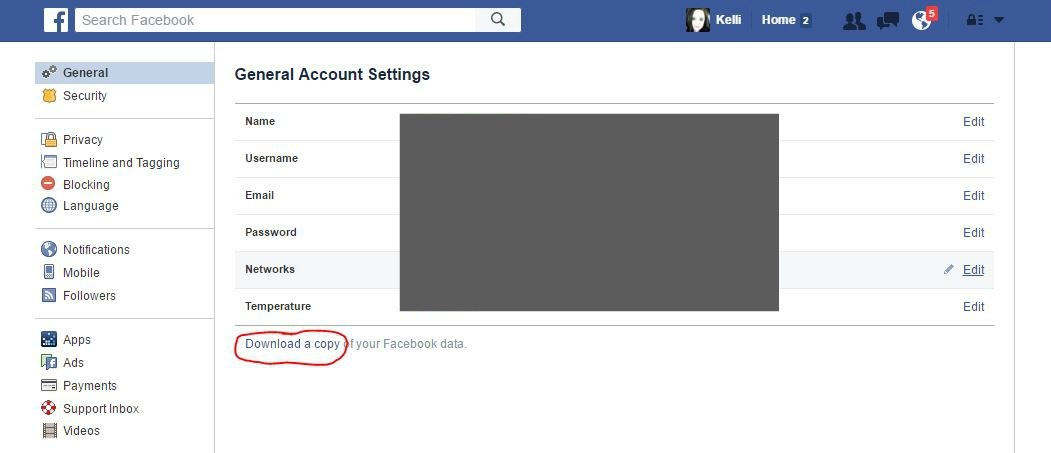
1. Log in, and pull up your Facebook settings


Facebook Settings, click here

2. Click "Download a copy of your Facebook data"


Facebook, download data

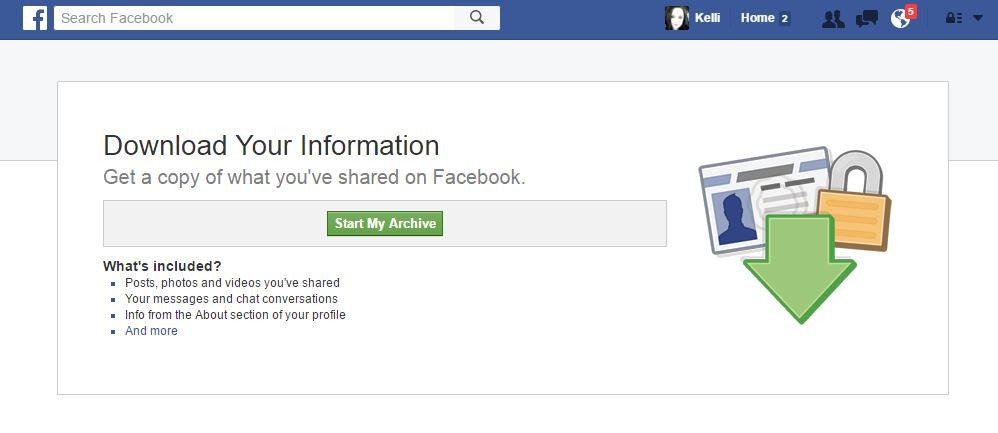
3. Click "Start My Archive"


Facebook new screen
Once you begin your archive, you'll be asked to confirm your password. Then you'll get an email from Facebook notifying you that the request has been made. This email also contains a link that provides more information about the types of data your download will contain. It also informs you that another email will be sent once your download is complete.When the process is finished, you'll receive that second email. It will contain a link that will allow you to download a Zip file that contains your data.

Tuesday, May 10, 2016

5 signs your computer or tablet might have a malware infection By Justin Ferris

As a computer user, you're well aware that computers can be temperamental at times. It will be working fine one minute and then suddenly slow down, glitch, sputter or crash, and then be working fine again a few minutes later.

In most cases, this comes down to a momentary hiccup in the software, which is why rebooting a computer fixes so many problems. It could also be another software or hardware problem you can fix yourself, if you know what to do. However, it might go deeper.

Your computer woes could be the result of a nasty virus. How can you tell? Here are five of the most common symptoms of computer viruses. If your computer shows one or more of these, you're probably infected.

1. Pop-up ads

Running into a pop-up ad while you're surfing used to be a serious annoyance, but modern browsers include pop-up protection to keep these annoyances away on most sties. If you're still seeing regular pop-ups on more than one site, it could just be a badly-configured browser.

However, if pop-ups are coming at you when your browser isn't even open, it's likely you have a virus. This is especially true if the pop-ups advertise some magic cure-all to your "virus woes"
If you are bombarded with pop-up ads, first run a scan with anti-spyware software to double-check. I like SpyBot Search & Destroy because it digs deep into your settings to find any problems spyware has left behind.

2. Messages you didn't send

Most viruses have one goal in mind once they infect your computer: to spread the virus as far as possible. An easy way to do that is to send messages to as many of your friends as possible in hopes they'll get infected, too.

These messages can show up anywhere. The virus might try to send out spam through your email account. It could take control of your Facebook or Twitter and send out spam, too. In almost all cases, it will include a link or attachment to the virus somewhere in the post.

Keep an eye on your email's "sent" folder and on your social network posts. If you notice emails and posts that you don't remember sending or posting, it's likely that you have a virus. Here is what you need to know to take your account back.

3. You're locked out of your computer

You're surfing the Web when suddenly a scary message appears saying you're locked out of your computer. It may claim to be from law enforcement or an anonymous blackmailer.

Either way, the program is lying. What's really happening is that a virus is blocking important programs from running, or even encrypting your files so you can't get to them. The scam is trying to make you pony up some cash to get your computer back. That's why it's commonly called "ransomware."
Didn't know there were different kinds of viruses? Click here to learn about the most common varieties and what they do.

Ransomware is no joking matter, which is why you need to be prepared in advance. Click here for my three-step plan to surviving a ransomware attack.

4. Programs and tools are out of reach

More often than not, a computer user will rely on one simple command when their computer starts misbehaving: Ctrl + Alt + Del. The "three-finger salute" opens up Task Manager, which can tell you so much about your computer.

Sometimes, however, you'll hit this keyboard shortcut and nothing happens. You might get a random error message, too. This is a dead giveaway that a virus is messing with your computer. It's stopping Task Manager so you can't see that it's eating your system resources or shut it down.

A virus might block any number of programs or utilities to try to protect itself. This is where deep-cleaning anti-malware software like Malwarebytes will shine. It goes much deeper than most anti-virus software to clean out your computer. Plus, it has a feature that helps it get around viruses that block popular anti-virus programs from running.

5. You're not seeing any symptoms at all

No news isn't always good news when it comes to viruses. Powerful viruses can hide deep in your computer without raising any red flags. They'll just go about their business without you even knowing they're there.

Just because you don't notice them doesn't mean they aren't dangerous, though. They could be snagging your passwords, sensitive files or other vital information from your computer. The virus could be using your computer to spread to other computers or even attack banks and other organizations.

The only clue in this case might be a slower Internet connection since the virus is using it. Click here to test your Internet speed and learn what to do if it's slower than it should be.

Your computer's processor and memory could also be running really high for no good reason. Click here to track down misbehaving programs and potential hidden viruses.

I do know some people who don't bother installing security software because their computer doesn't seem to have a problem. If that's you, let me tell you that you probably do have a virus. Every computer user, even Mac users, needs security software running at all times.